


10.1-Inch IPS HDMI Touchscreen Monitor with Stand, 1024×600 Display for Raspberry Pi 5, 4B & 3B Projects
$230.99$300.2923% off
Discount only available in


Product Overview
Bring your projects to life with this 10.1-Inch IPS HDMI Touchscreen Monitor, designed to deliver clear visuals and responsive touch functionality for compatible Raspberry Pi devices and other HDMI-supported systems. Featuring a 1024×600 IPS display, it offers wide viewing angles and vibrant image quality, making it ideal for DIY electronics, programming, media playback, and embedded system projects.
Complete with a sturdy desktop stand, this compact touchscreen monitor is easy to set up and convenient to use in home, classroom, workshop, or office environments. Whether you're building a smart display, control panel, or portable workstation, it provides a versatile solution for a wide range of applications.
---
Key Features
• 10.1-inch IPS touchscreen with clear and vibrant display
• 1024×600 resolution for sharp image quality
• HDMI connectivity for easy setup with compatible devices
• Includes a sturdy stand for stable desktop placement
• Compatible with Raspberry Pi 5, 4B, 3B, and other HDMI-supported devices
---
Specifications
• Screen Size: 10.1 Inches
• Display Type: IPS Touchscreen
• Resolution: 1024 × 600
• Interface: HDMI
• Compatibility: Raspberry Pi 5, Raspberry Pi 4B, Raspberry Pi 3B & Other HDMI-Compatible Devices
• Package Includes:
- 1 × 10.1-Inch IPS HDMI Touchscreen Monitor
- 1 × Desktop Stand
- 1 × HDMI Cable
- 1 × USB Cable
- 1 × User Manual
---
Why You'll Love It
• Delivers vibrant visuals with wide viewing angles.
• Responsive touchscreen enhances interactive projects.
• Easy HDMI connection simplifies setup and installation.
• Compact design fits perfectly on desks and workstations.
• Ideal for Raspberry Pi projects, DIY electronics, and embedded applications.
---
Enhance your Raspberry Pi projects with this 10.1-Inch IPS HDMI Touchscreen Monitor and enjoy responsive touch control with crisp, vibrant visuals.
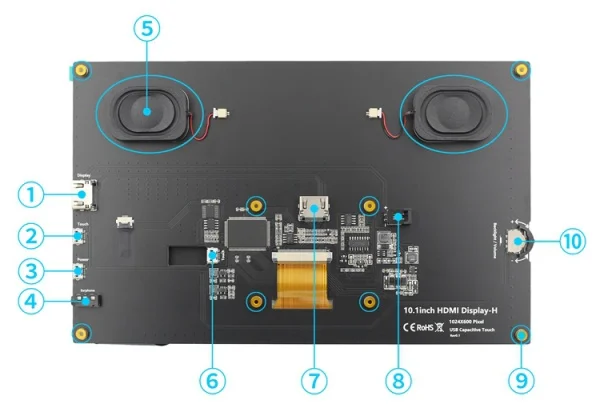
-
① HDMI Interface - Input HDMI signal, using HDMI cable connection, commonly used to connect to the computer,The maximum supported resolution is 1920x1080
-
② Touch Interface - Transfer touch signal, connect with micro USB cable, provide touch and power supply function, commonly used to connect computer
-
③ Power Interface - Connect to the power supply and use micro USB cable to connect. Only power supply function is provided
-
④ 3.5mm Audio Interface - Output audio signal, connect audio output device, such as headphones
-
⑤ Stereo speakers - Output audio signal for external playback of audio signal
-
⑥ Touch Interface - Transmit touch signal, connect with micro USB cable, provide touch and power supply function, commonly used to connect Raspberry Pi
-
⑦ HDMI Interface - Input HDMI signal, connect with HDMI adapter, only used to connect to the Raspberry Pi,The maximum supported resolution is 1024x600
-
⑧ Cooling Fan Interface - Connect cooling fan
-
⑨ Copper x 8 - Used to connect raspberry pie and scaffolds
-
⑩Wheel Switch - Used to adjust screen backlight brightness and volume. By default, in the volume adjustment state, up and down to adjust the volume + and -. Press the switch to switch to the backlight brightness adjustment state, up and down to adjust the backlight brightness increase and decrease respectively. The volume and backlight brightness adjustment state is switched by pressing the switch.
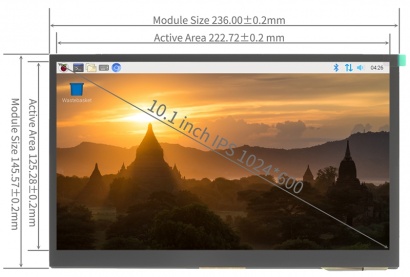
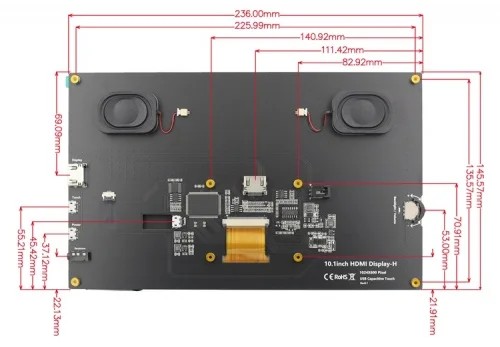
Product Size
Connect to Raspberry Pi
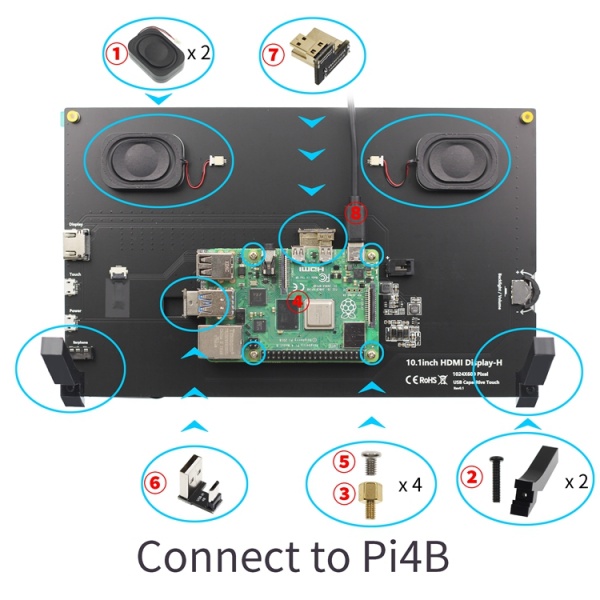
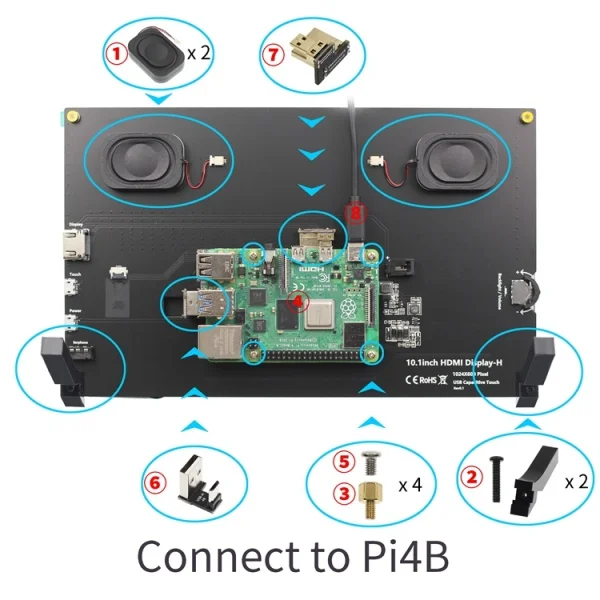
Working with Raspberry Pi
Step 2. Brun Official Image
-
SD card format software SDCard Formatter download URL :https://www.sdcard.org/downloads/formatter_4/
-
Image burning software win32diskimager download URL: https://sourceforge.net/projects/win32diskimager/
-
Insert the SD card into the card reader -> Insert the card reader into the computer -> Open the SDFormatter software -> Select SD card ->
Select quick format (generally select quick format, other options can be selected according to your own needs) -> Click the Format button ->
Select "Yes" -> Click OK after formatting.
-
Open the win32diskimager software -> Select the image file to be burned (xxx.img ) -> Select SD card -> Click the "write" button ->
Select "Yes" -> Wait for the burning to complete (the whole process lasts about 10 minutes)
Step 3. Modify the “config.txt” configuration file
-
Open the “config.txt” file in the root directory of SD card on the computer, Add the following at the end of the file, save and exit.
Step 4. Insert SD card
-
After the above steps are completed, pop up the SD card on the computer and insert it into the SD card slot on the back of the raspberry pie.
Step 5. Running system
-
Connect the HDMI interface and touch interface of the display screen to raspberry pie, connect the power supply of raspberry pie,
and start the machine to display and touch normally.
Work as HDMI touch monitor
-
This product can be used as the HDMI touch monitor of Windows computer, only need to connect HDMI interface and TOUCH interface, can normally display and support up to five points touch.
Package List
-
1 x 10.1 Inch Display
-
1 x HDMI to HDMI Cable
-
1 x Micro-USB to USB Cable
-
1 x Dual Speakers
-
1 x Micro-HDMI Adapter (For RPI 4B)
-
1 x USB-Micro Adapter (For RPI 5/4B)
-
2 x Display Stand
-
8 x Screws
-
1 x Installation kit
-
1 x Micro-HDMI Adapter (For RPI 5/3B)
-
1 x USB-Micro Adapter (For RPI 3B)
Cetifications:
